
The roof is leaking. The kitchen is showing its age. Both need work.
Only one of them will ruin your week if you ignore it.
Tom runs a forty person nonprofit in Portland, and his IT list looks the same way. A few laptops are old but still running. A software license renews in February. The IT provider flagged a security improvement in the last review.
And the program staff have been asking, politely and then less politely, to replace the intake system that frustrates them every single day.
Every item on that list has a reason behind it. That does not mean every item gets funded at the same time.
The real work of IT budgeting is not finding things to spend on. It is deciding what deserves attention now, what to prepare for next, and what can reasonably wait. Three questions sort that list.
What happens if we wait?
Start with the consequence, not the age of the request.
An older laptop that is still reliable and still supported is an inconvenience. A security gap that exposes client data is a different category of decision. So is a system that goes down twice a month and sends six people home early.
Before approving or denying an item, picture the business three and six months from now if nothing changes. Do people lose hours? Does the business take on downtime or risk it does not need to? Does a manageable problem become an expensive one?
The priority should reflect what waiting costs, not how long the item has been on the list.
How do you prioritize IT spending for a small business?
Rank every request by the cost of waiting, not by how loudly it was asked for. Items that create risk, downtime or lost hours go first. Items with a fixed date, like renewals and planned hires, go second and get a calendar entry. Everything else is a candidate to defer a quarter, and that is a legitimate answer, not a failure.
How do you decide which IT projects can wait?
Ask what the business loses by delaying it one quarter. If the honest answer is "some convenience," it can wait. If the answer involves client data, compliance, downtime or employees working around a broken tool every day, it cannot. Write the answer down next to the item so the decision survives the next budget meeting.
What do we already know is coming?
A surprising share of technology costs are known a year in advance. They just have not been written down.
Say the business runs on Microsoft 365 and plans to add three people in the spring. Those three people will need accounts, licenses and laptops. You are not paying for any of it today, but the expense is already real. The same is true of every software contract, warranty and support agreement with a date attached.
Knowing the date gives you options. You can set the money aside, spread purchases across quarters, or push a less important project back to make room. What you cannot do is plan around a date you never looked up.
What IT costs can a business predict a year ahead?
Most of them. Software renewals, hardware warranties, support contracts, licenses for planned hires, and the replacement of any machine that is already past four years old all have dates or ages you can look up today. The unpredictable costs, a failed drive or a vendor price change, are real but small compared to the known costs that simply were not scheduled.
What is changing in the business?
What the business plans to do next changes what it needs from technology. Take a company preparing to open a second location. Along with the lease come questions about internet, Wi-Fi, phones and equipment for a new site, how people there will reach the company's systems, and who supports them when something breaks.
Leave those questions until opening week and you have no time to compare options, solve problems or plan the cost. You get whatever can be installed fastest.
The same is true of a shift to hybrid work, a new service line, or any change in how the business operates. Each one brings technology needs that surface only once the work is underway. Before deciding what gets funded, make sure the IT budget reflects what the leadership team has already decided to do next year.
What technology does a business need before opening a second location?
Internet service with enough capacity, business grade Wi-Fi, a firewall, phones that connect to the main office, secure access to shared files and systems, and a support arrangement for the people who will work there. Order of operations matters: internet installation can take weeks, so it goes first, and everything else is sequenced behind it. Start that conversation the week you sign the lease, not the week you open.
Know what comes first
The roof and the kitchen both need attention. The difference is knowing which one can wait, and being able to explain why.
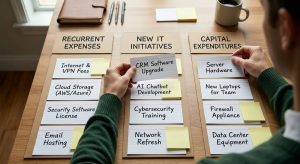
The same thinking belongs in the IT budget. Some expenses address problems that will disrupt the business or get more expensive over time. Some prepare you for changes you already know are coming. And some can sit on the list another quarter without creating a bigger problem.
Nobody should have to treat every IT request like an emergency. A good technology planning conversation sorts the list into those three groups and includes the one answer most IT vendors avoid giving: this one can wait.
Is it better to spread IT purchases across the year?
Usually yes, as long as the spread is driven by the calendar and not by avoidance. Scheduling replacements and renewals across quarters smooths cash flow and keeps any one month from becoming a shock. Spreading them out because nobody wants to make a decision is different, and it tends to concentrate the cost in the one quarter when several things fail at once.
10D Tech provides managed IT services and cybersecurity for businesses with 10 to 250 employees across Oregon and southwest Washington, from Portland and Salem through Albany, Corvallis and Eugene to Bend. The work with credit unions, nonprofits, engineering firms, professional services and manufacturers starts the same way every time: an honest look at what is on the list and what each item would cost to ignore.
If you are not sure which items on your list are the roof and which are the kitchen, start with a number, a score that shows what IT, Cybersecurity and AI guardrails you can change and improve on. A complimentary Technology Confidence Score call gives you a clear picture of where your systems stand today, along with your score out of 100. See how the Score works at 10dtech.com/aspirin, then schedule at 10dtech.com/Tech_Confidence_Score. Albany, Corvallis, Eugene, Bend areas: 541-243-4103. Portland, Salem areas: 971-915-9103.